 F2+F3
F2+F3Screenshot manager for technical Minecraft
Every screenshot remembers where it was taken
F2+F3 reads the coordinates, biome, mobs and builds behind each screenshot and keeps them one click away. Its Fabric mod puts the same gallery, your map plans and a materials list inside the game.
In practice
Three keys you already know
There is nothing to learn. You keep taking screenshots the way you always have.
Press F2
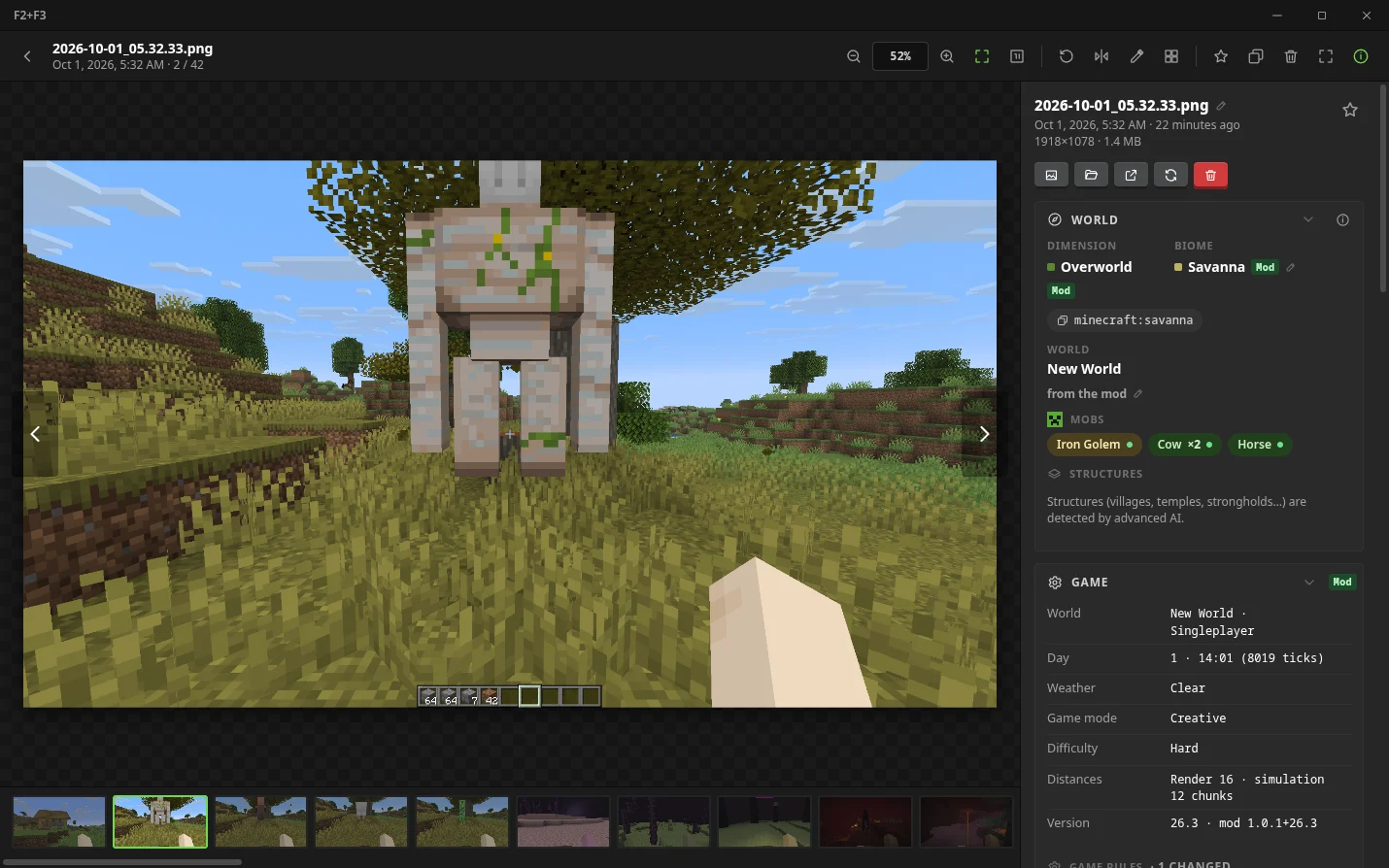
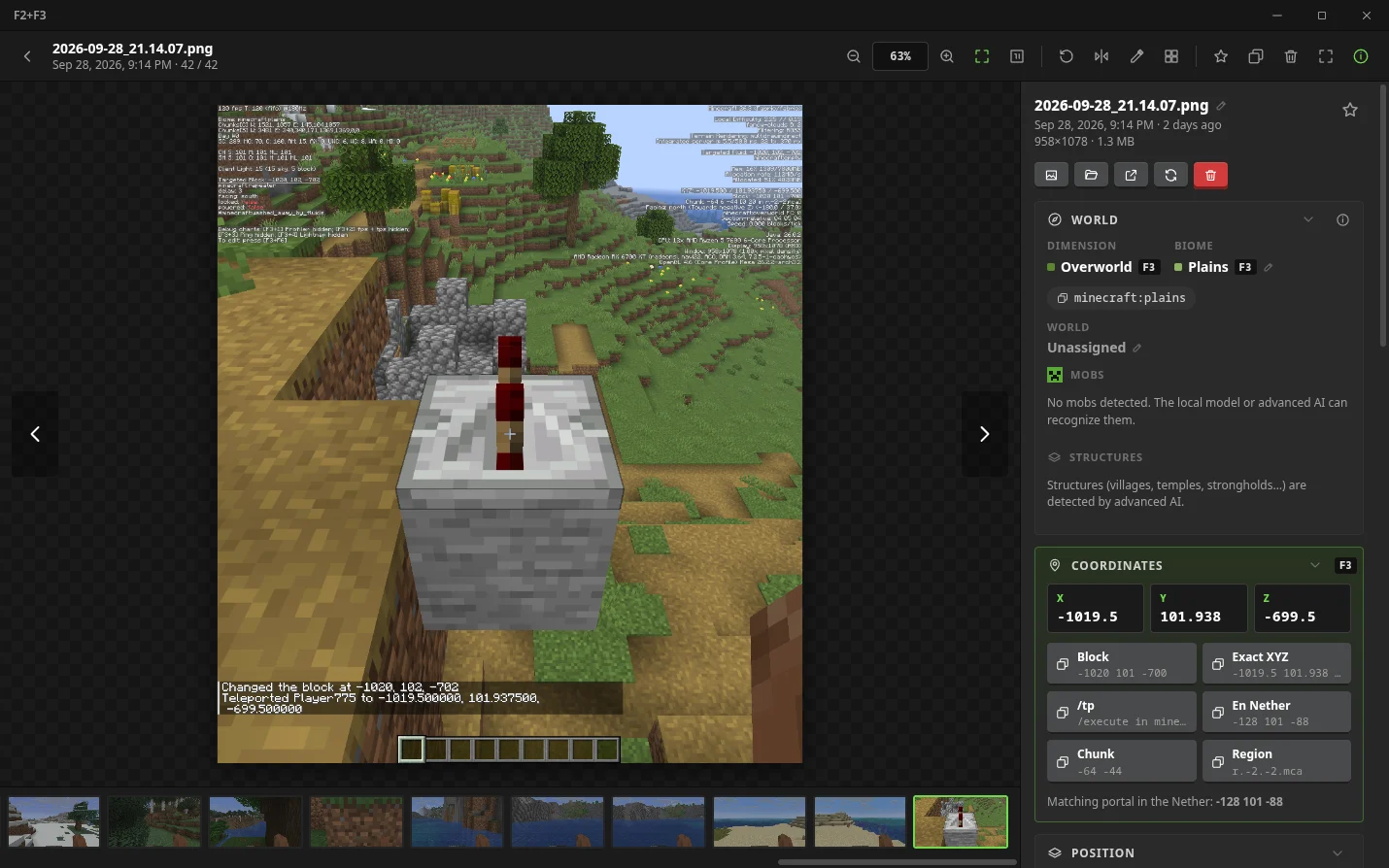
Take the screenshot as usual. With the mod installed, the exact game data is saved next to it. Without the mod, leave F3 open and the app reads it from the image.
Open F2+F3
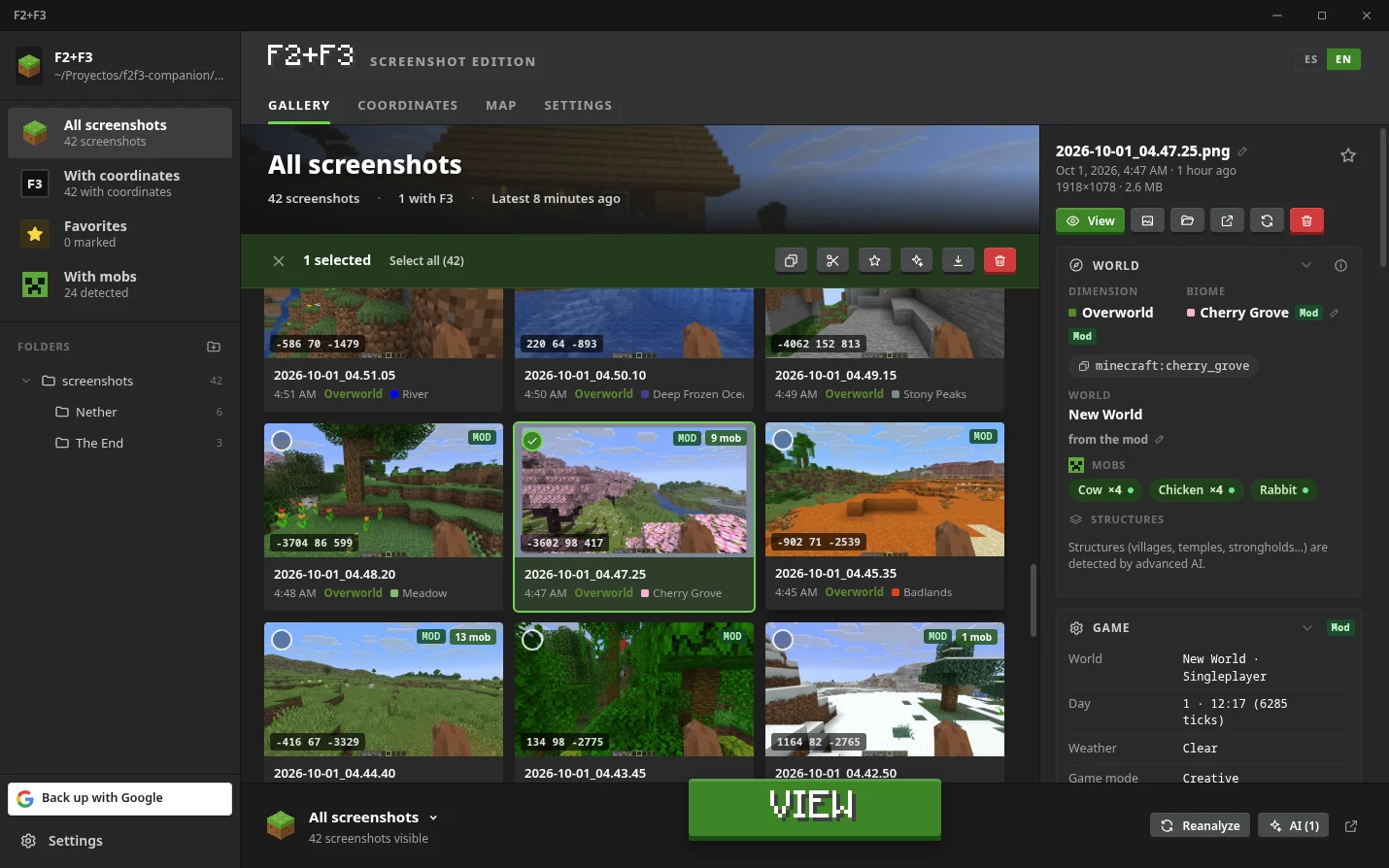
Your captures appear sorted by world and folder. Search by biome, dimension or mob, and copy the coordinates or a /tp command with one click.
Go back there
Press F6 in the game, pick a capture and follow the arrow. Or pin the materials of a build to the HUD and gather them.
The desktop app
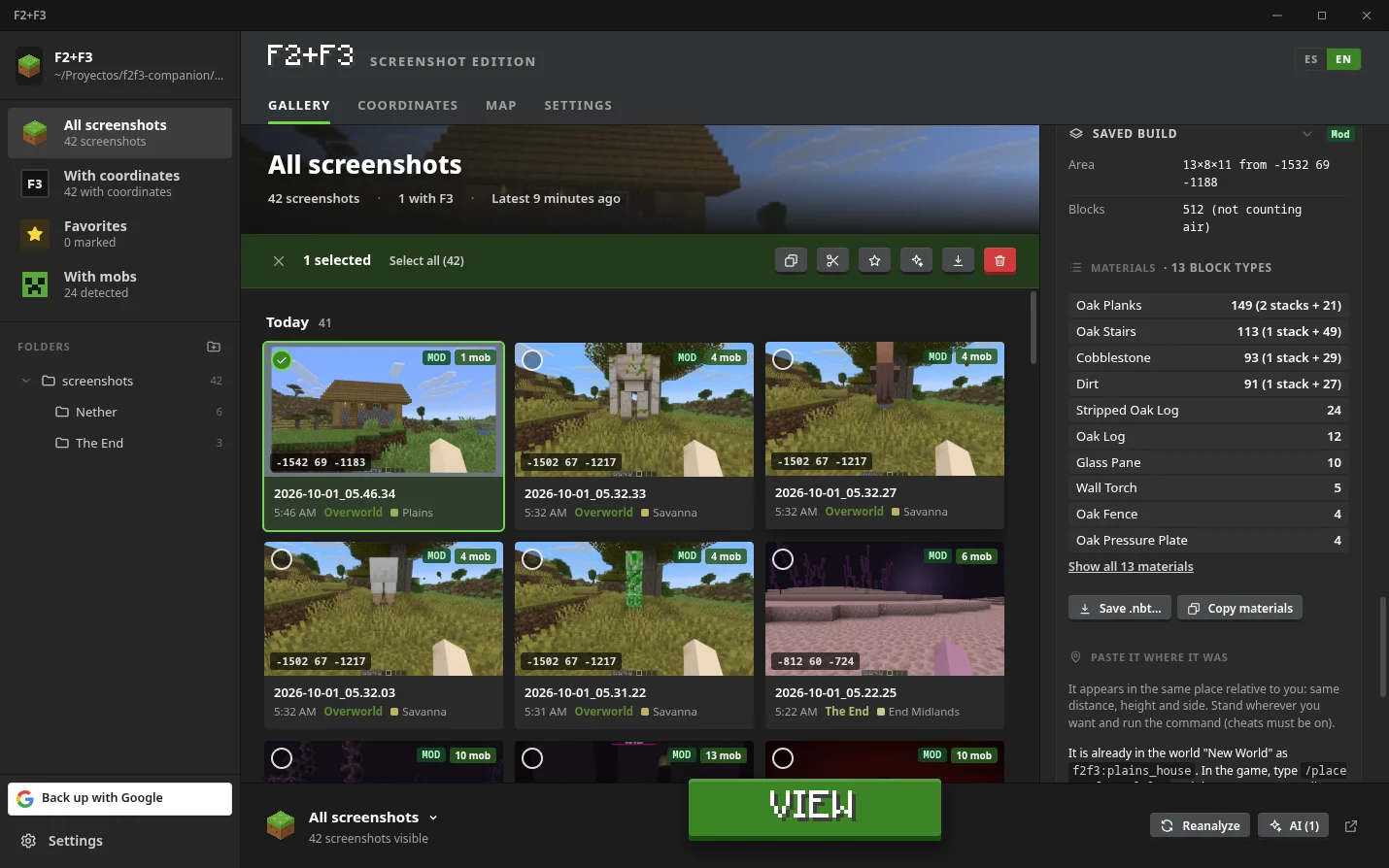
A launcher for your screenshots
It looks like the Minecraft Launcher on purpose, so it feels like part of the game. It works with the official launcher and with instance launchers, several game folders at once.
Everything about one capture
Position, chunk, facing, light, weather, game mode, the block and entity at the crosshair, nearby mobs and structures. Every value shows where it came from.
- Copy XYZ or a ready /tp command
- Technical panel: TPS and MSPT, mob caps, gamerules, redstone signal, container contents
- Villager trades of the villager you were looking at
Map and planners
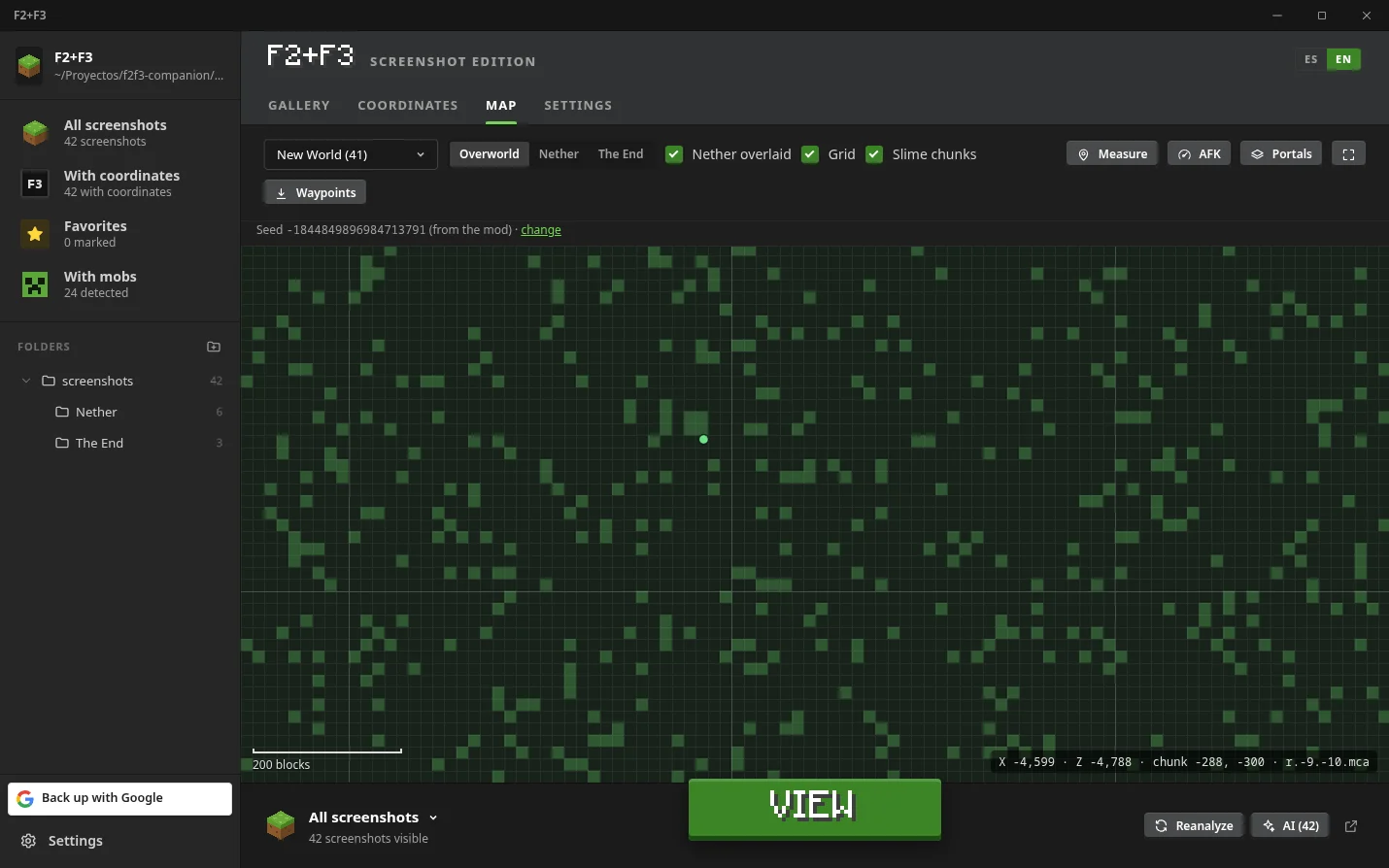
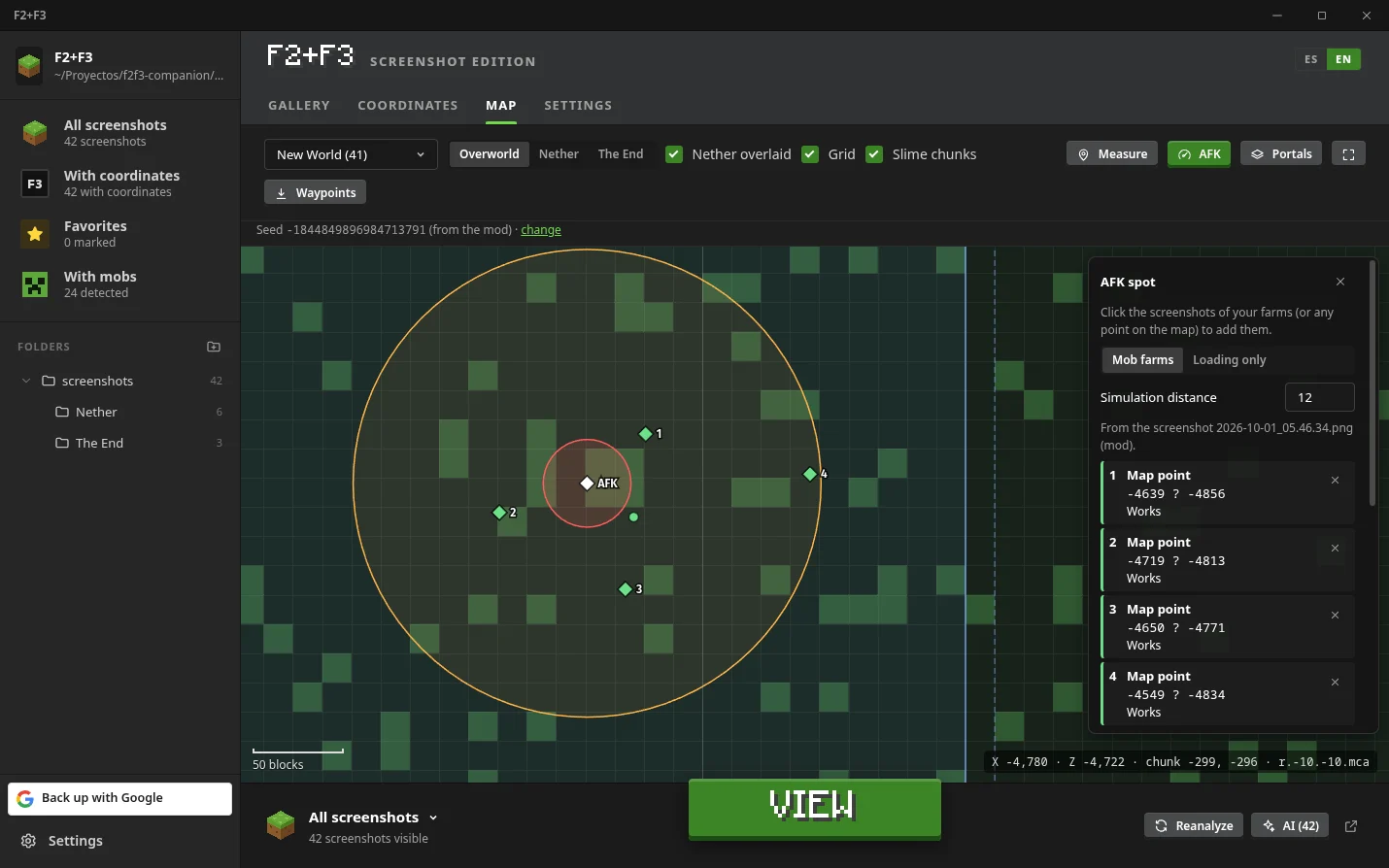
Every capture is a point on a map per world and dimension. Switch between Overworld and Nether coordinates, see chunk and region borders, and the slime chunks of your seed.
- AFK planner: the 24 and 128 block spawn spheres around a spot, and which farms stay loaded
- Portal planner: where a portal will actually link
- Export waypoints for Xaero and JourneyMap
Builds you can take with you
Hold Shift and press F2 to capture a build with its photo. The app shows its size and materials in stacks, exports the .nbt, or pastes it into another world.
- Standard vanilla structure format
- Material list ready to copy
- Place it back from the in-game gallery, rotated to where you face
Gallery
Folders, favourites, notes and tags on top of your real screenshots folder. Nothing is copied or locked in a database.
Backup to your own Google Drive
Sign in with Google and the captures and their data go to a folder in your account. The app only sees the files it created.
English and Spanish
One button switches the whole interface. The mod follows the language of the game.
Linux and Windows
AppImage and Windows installer. It can start with the system and stay in the tray watching for new captures.
F2+F3 Companion · Fabric
The app, inside the game
A client-side mod for Minecraft 26.3, 1.21.1 and 1.20.1. It needs no other mod, not even Fabric API.
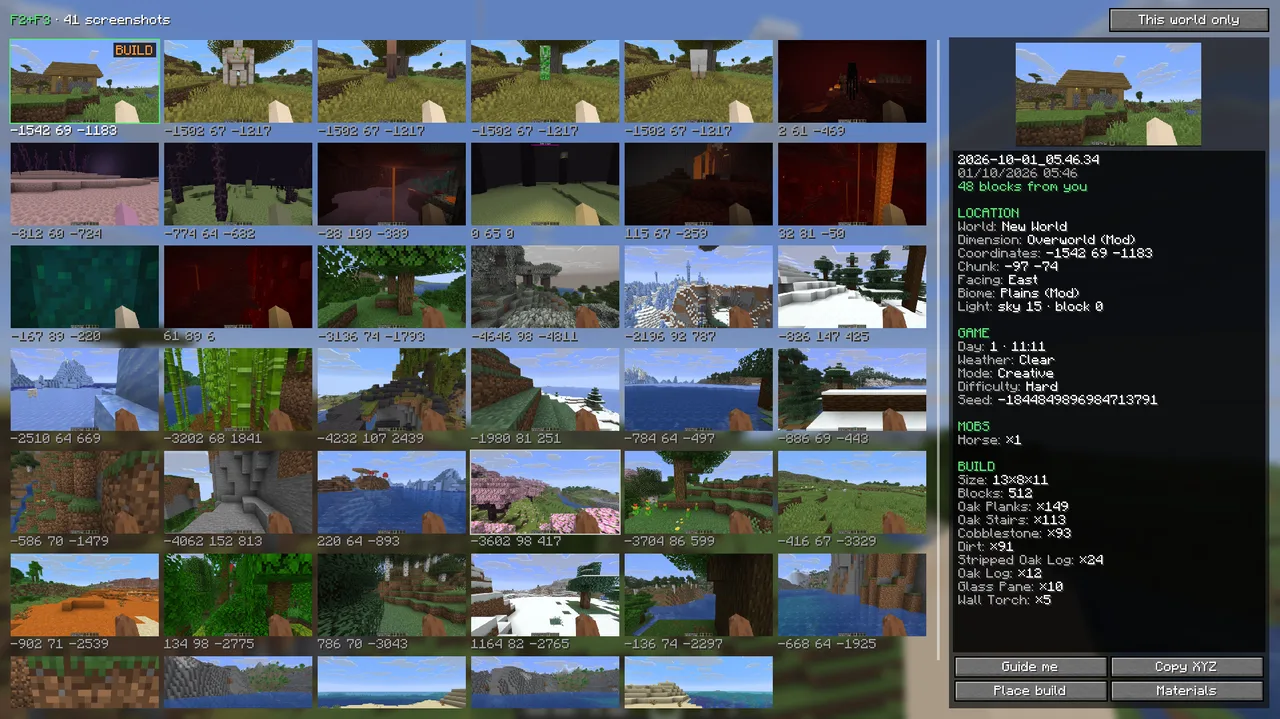
In-game gallery
F6
Your captures of this world with their data, notes and favourites from the app. Copy the coordinates or ask to be guided there.
Pinned materials list
M
Pin the materials of a build to the right of the HUD. It counts your inventory as you gather and ticks off each line until you have everything.
Your map plans in the world
J+Shift+J
The AFK spot with its 24 and 128 block spheres, your farms, linked portals and slime chunks, drawn where they are.
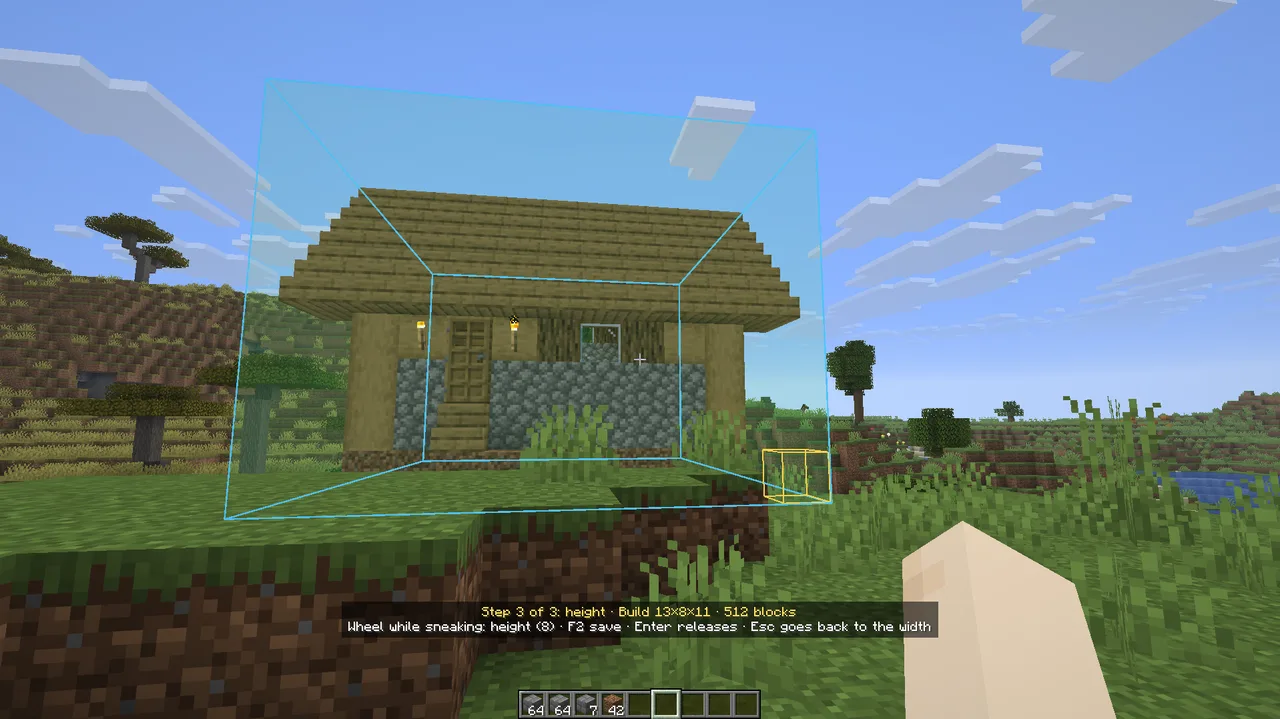
Capture and place builds
Shift+F2
Mark depth, width and height with the wheel, name it and it is saved. Placing it shows a box you can rotate and move before confirming, with undo.
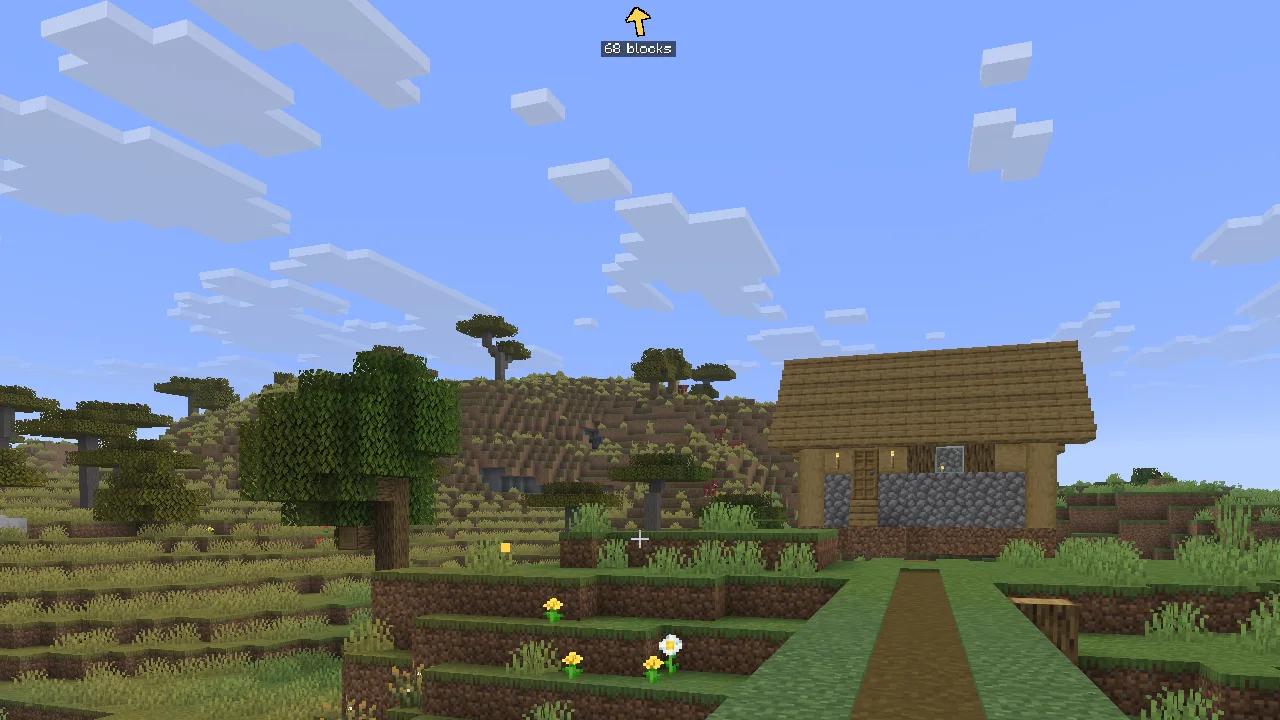
Guide
H
An arrow on the HUD with the distance and how far up or down. Between the Overworld and the Nether it points to the matching coordinates.
{
  "format": "f2f3-companion", "schema": 1,
  "world": { "name": "Technical", "seed": "-1844849896984713791",
             "dimension": "minecraft:overworld", "day": 12, "weather": "clear" },
  "player": { "block": { "x": -1374, "y": 67, "z": -2035 },
              "facing": { "direction": "north", "yaw": -151.8 } },
  "biome": "minecraft:desert", "light": { "sky": 15, "block": 0 },
  "target": { "entity": { "id": "minecraft:villager", "distance": 3.2 } },
  "entities": [ { "id": "minecraft:camel", "count": 2, "nearest": 12.5 } ],
  "structures": { "inside": [ "minecraft:village_desert" ] },
  "game": { "tick": { "rate": 20.0, "mspt": 3.06 } }
}
Exact data with every F2
F2
A small JSON file next to the image with what the game knows: seed, biome, structures you are inside, visible mobs, gamerules and tick rate.
Under the hood
How it knows
A capture can be described by up to five sources. Each is stored separately, and the app always shows the most reliable one available, labelled with its origin.
- Mod
The companion file written by the mod at the moment of the capture. Read straight from the game, including things F3 never shows.
Exact - F3
OCR of the debug screen. No machine learning: the app loads the game font from your installed version and matches its glyphs pixel by pixel.
Exact - Advanced AI
Optional, with your own key or a local Ollama. A vision model describes the scene, including structures.
Estimated - Local model
Optional 170 MB download that runs offline on your CPU. Biome and the mob at the crosshair, and only when it is confident.
Local - Colours
Always available. Dimension and a rough scene guess from the colours of the image.
Approximate
A value you set by hand beats all of them. Re-analysing a capture keeps the AI and manual results, so nothing is paid for twice.
Reading F3 without guessing
Minecraft draws its debug screen with a bitmap font, so every character is an exact pattern of pixels. F2+F3 extracts that font from the jar of your installed version, finds the GUI scale of the capture and compares glyphs directly. The result is the number the game printed, not an approximation of it.
The parser then understands the layout of each version: position, chunk, facing, light, the targeted block with its state and tags, server TPS and MSPT, /tick state, day, and the mob cap counters by category.
One small contract between mod and app
The mod and the app never talk to each other. They share four files, validated with a schema where each section fails on its own: a malformed block of data is dropped and the rest is kept.
| File | Direction | Contents |
|---|---|---|
NAME.f2f3.json | mod → app | Exact data of one capture |
NAME.f2f3.nbt | mod → app | The build, as a vanilla structure |
f2f3/app-index.json | app → mod | Notes, tags and sheets for the in-game gallery |
f2f3/plans.json | app → mod | AFK and portal plans per world |
Architecture
Electron, React and TypeScript, split so that the logic that matters has no dependency on Electron and is tested on its own.
- Analysis runs in worker threads and is cached by file size and modification time
- Context isolation, sandbox and a strict CSP; API keys never leave the main process and are encrypted with the system keychain
- 172 automated tests, with real fixtures: F3 screenshots, mod files and .nbt builds from each supported version
Game mechanics, checked against the game
The planners do not rely on wiki folklore. The rules were read from the game bytecode and the slime chunk formula is validated against the game own random generator.
- Mobs spawn between 24 and 128 blocks from the player, in a 3D sphere
- A chunk spawns mobs only if its centre is within 128 horizontal blocks
- Portals search a ±16 block square in the Nether and ±128 in the Overworld, over the full height, picking the closest in 3D
- Slime chunks computed from the seed with 64-bit arithmetic
One mod, three Minecraft versions
The mod is written once against 26.3, which ships unobfuscated. The 1.21.1 and 1.20.1 ports keep the same code and add a thin compatibility layer that imitates the newer classes, so a feature is ported by copying it.
- Every hook is a mixin: screenshot, tick, HUD, keyboard and mouse wheel
- Files are written off the game thread, to a temporary file and then moved, so the app never reads half a file
- Builds are placed through the integrated server, not with commands, so it works without cheats
| Minecraft | Java | Mappings | Rendering of world shapes |
|---|---|---|---|
| 26.3 | 25 | None needed | Game gizmos API |
| 1.21.1 | 21 | Official Mojang | Own layer over Tesselator |
| 1.20.1 | 17 | Official Mojang | Own layer, PoseStack |
Artificial intelligence
AI, with the numbers on the table
When there is no mod and no F3 on screen, the image is all there is. F2+F3 has two AI levels for that case. Both are optional, both are labelled as estimates, and we measured how often the local one is right.
The local model
A CLIP ViT-B/32 vision model in half precision, run with ONNX on your CPU. Nothing is uploaded. It works zero-shot: instead of training a classifier, the image is compared with text descriptions of each biome and mob.
Those descriptions are embedded once, when the app is built, and shipped as a small JSON file. That is why you only download the vision half of the model: 170 MB instead of the full pair.
- Two crops per capture: the scene without the F3 columns and the hotbar for the biome, and the area around the crosshair for the mob
- Candidates are limited to the dimension: no ghasts in the Overworld
- It answers only above a confidence threshold and with a clear margin over the runner-up
- Colour checks veto impossible answers: a cherry grove needs pink, a desert needs sand
- Structures are left to the advanced level: local zero-shot models could not tell them apart in our tests
Measured, not promised
We built a labelled set in the game: the mod wrote the real biome of every capture and we summoned each mob at the crosshair. Then the local model analysed the images without that data.
What it did with each capture
With mobs the model does what it was designed for: it stays quiet most of the time, and when it speaks it is usually right. Biomes are its weak point. A general-purpose model confuses neighbouring biomes and has no label for many of them, which is why the app shows its biome as an estimate you can correct, and why the exact sources always win.
Method
- 248 captures taken in Minecraft 26.3 at 1918×1078, default resource pack, by a script that teleports to each biome
- Five captures per biome site from different points and angles, four at midday and one at dusk; each mob three to five blocks away, in three settings per dimension, one of them at night
- Ground truth: the biome reported by the game at the player position and the mob that was summoned
- The dimension was given, as F3 provides it; the F3 overlay itself was hidden
- Underground biomes were not sampled, and the biome is the one where the player stands, which near a border is not always the one in view
Xenova/clip-vit-base-patch32 (fp16)
Results by biome
| Captures | Right | Wrong | No answer | |
|---|---|---|---|---|
badlands | 2 | 0 | 0 | 2 |
basalt_deltas | 3 | 0 | 2 | 1 |
beach | 1 | 1 | 0 | 0 |
cherry_grove | 2 | 0 | 0 | 2 |
crimson_forest | 7 | 3 | 2 | 2 |
dark_forest | 7 | 1 | 4 | 2 |
desert | 6 | 0 | 3 | 3 |
end_highlands | 2 | 1 | 1 | 0 |
forest | 6 | 0 | 2 | 4 |
jungle | 3 | 1 | 1 | 1 |
meadow | 2 | 1 | 1 | 0 |
mushroom_fields | 1 | 0 | 1 | 0 |
nether_wastes | 11 | 7 | 2 | 2 |
ocean | 3 | 2 | 0 | 1 |
plains | 13 | 1 | 9 | 3 |
river | 13 | 2 | 5 | 6 |
savanna | 8 | 0 | 2 | 6 |
snowy_plains | 10 | 4 | 0 | 6 |
soul_sand_valley | 2 | 0 | 1 | 1 |
stony_peaks | 3 | 0 | 1 | 2 |
swamp | 2 | 0 | 0 | 2 |
taiga | 9 | 0 | 3 | 6 |
the_end | 6 | 5 | 1 | 0 |
warped_forest | 2 | 1 | 0 | 1 |
Results by mob
| Captures | Right | Wrong | No answer | |
|---|---|---|---|---|
blaze | 3 | 0 | 0 | 3 |
chicken | 3 | 0 | 0 | 3 |
cow | 3 | 0 | 0 | 3 |
creeper | 3 | 1 | 0 | 2 |
enderman | 8 | 7 | 0 | 1 |
ghast | 3 | 0 | 0 | 3 |
hoglin | 3 | 0 | 0 | 3 |
horse | 3 | 0 | 0 | 3 |
iron_golem | 3 | 0 | 0 | 3 |
pig | 3 | 1 | 1 | 1 |
piglin | 3 | 0 | 1 | 2 |
sheep | 3 | 1 | 0 | 2 |
skeleton | 6 | 0 | 0 | 6 |
slime | 3 | 3 | 0 | 0 |
spider | 3 | 2 | 0 | 1 |
strider | 3 | 0 | 0 | 3 |
villager | 3 | 0 | 1 | 2 |
witch | 3 | 1 | 0 | 2 |
wolf | 3 | 0 | 0 | 3 |
zombie | 3 | 0 | 0 | 3 |
zombified_piglin | 3 | 1 | 0 | 2 |
The advanced level
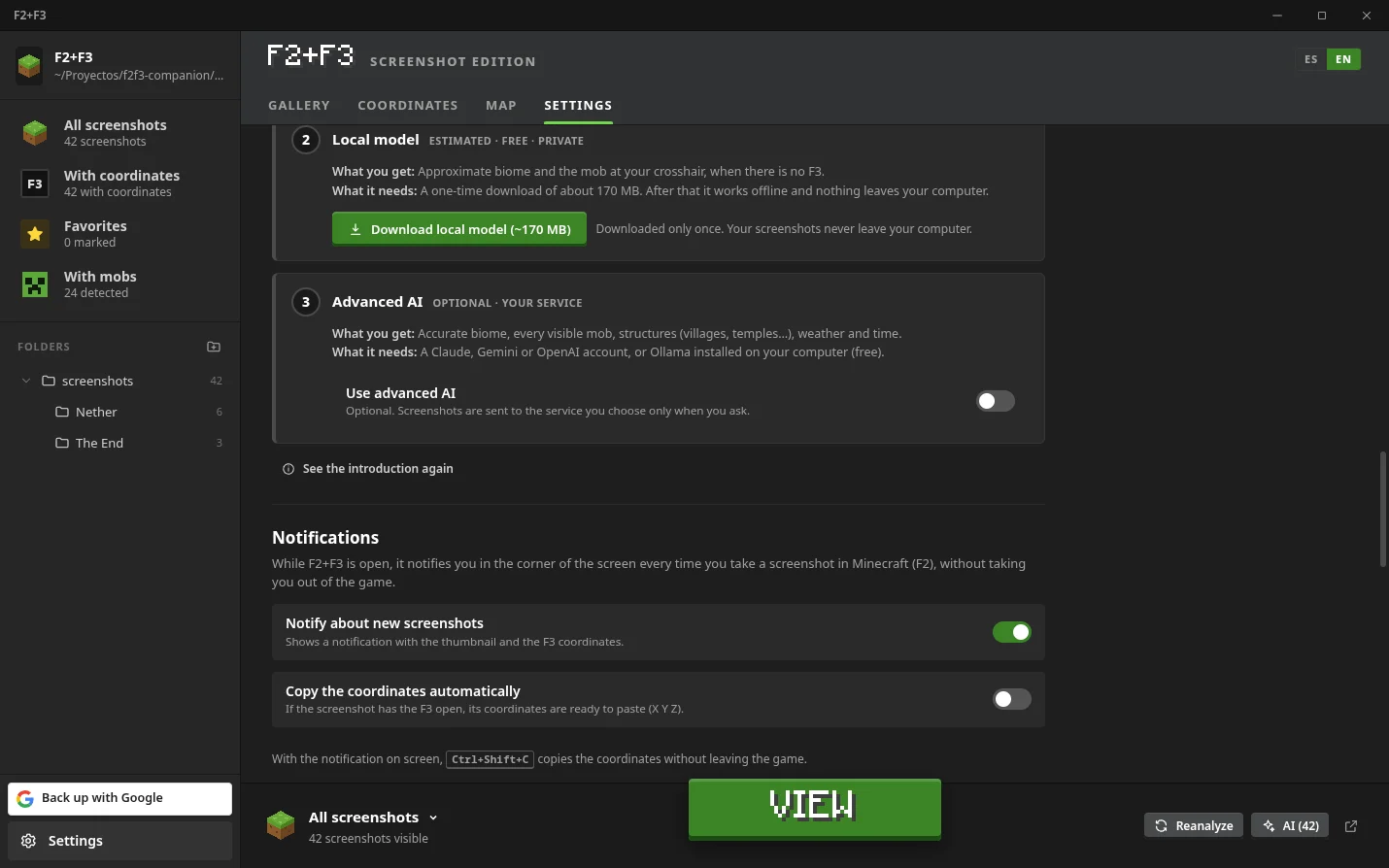
For the captures that matter, a large vision model can describe what a small one cannot: structures, weather, time of day, every mob in the frame. You choose the provider and use your own key.
- Claude, OpenAI or any compatible endpoint, Gemini, or Ollama running on your machine
- The answer must follow a fixed schema and is validated before it is stored
- What F3 already read is passed as context, and the model is told to ignore the debug text
- Batch analysis asks for confirmation with the number of requests before spending anything
- Keys are stored encrypted on your computer and never reach the interface code
Built with AI, too
F2+F3 was developed in pair with Claude Code: the app, the mod and its ports, the tests and this evaluation. Every commit in both repositories says so.
Download
Get F2+F3
Free and open source. The app includes the mod: Settings › Save the mod puts the right jar in your mods folder.
Companion mod · Fabric
Client only. Requires Fabric Loader. No Fabric API needed.